> For the complete documentation index, see [llms.txt](https://ctee.gitbook.io/creator-center/llms.txt). Markdown versions of documentation pages are available by appending `.md` to page URLs; this page is available as [Markdown](https://ctee.gitbook.io/creator-center/ja/manager/fandom/membership/management.md).
# メンバーシップメンバー管理
「メンバーシップメンバー管理」機能を利用することで、ファンのメンバーシップをより効率的に管理できます。
有効中のメンバーと終了したメンバーを簡単に区別でき、メンバーごとの各種データをすぐに確認できるため、**運営効率**が大幅に向上します。
### **1. メンバー管理画面へのアクセス方法**
* PC : プレイス管理ページへ移動後、左側メニューから\
**メンバーシップ > メンバーシップメンバー管理** をクリックします。
* モバイル : プレイス管理ページへ移動後、左上のメニュー(≡)をタップし、\
**メンバーシップ > メンバーシップメンバー管理** をタップします。
***
### **2****.** メンバー状況を確認する
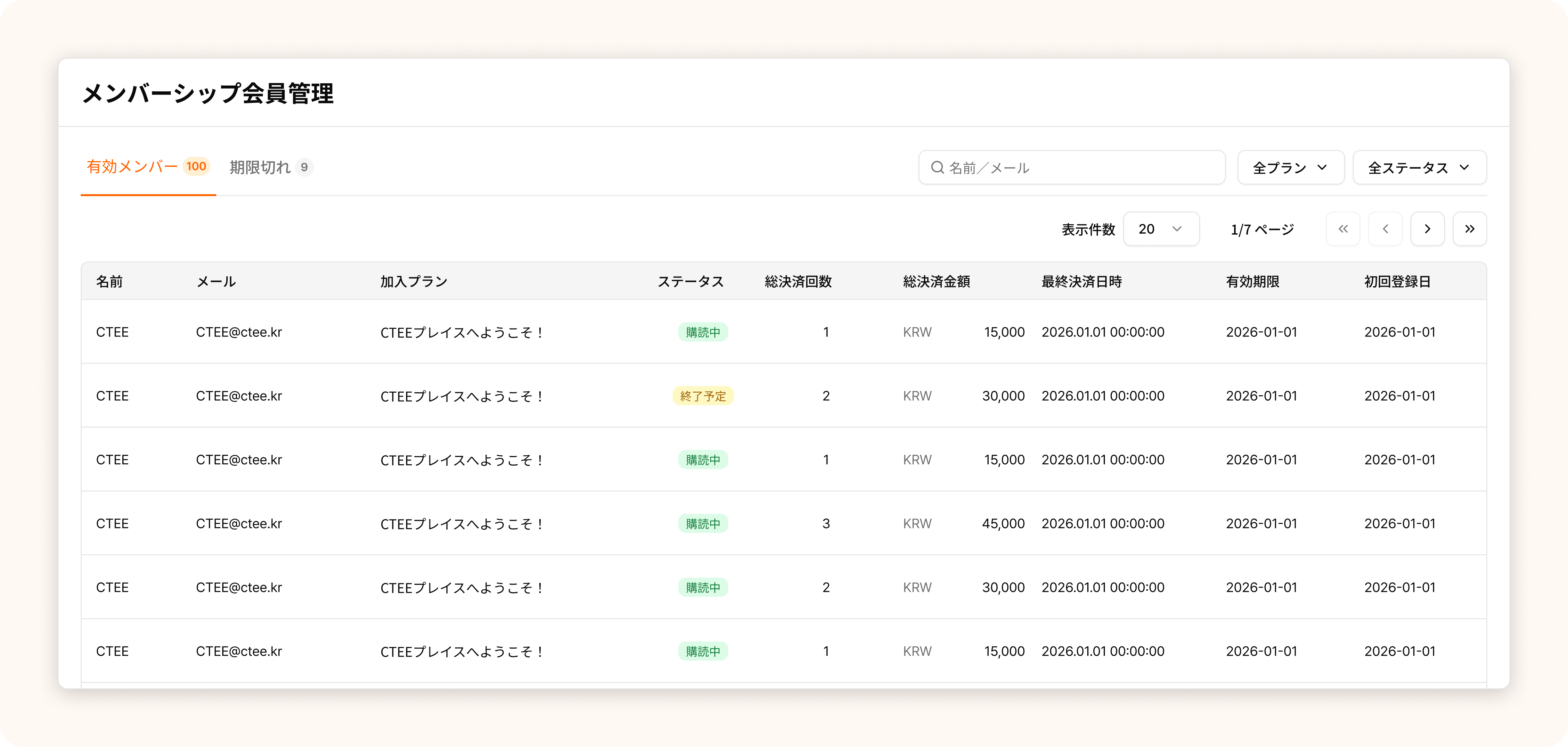
メンバー管理画面では、以下の情報を確認できます。
 #### **1)** メンバー基本情報
* メンバーの **名前、メールアドレス、現在利用中のプラン** などの基本情報を確認できます。
#### **2)** メンバー検索
* **名前またはメールアドレス** でメンバーを検索できます。
#### **3)** メンバーの状態区分
* **有効メンバー**:現在メンバーシップを利用中のファン
* **期限切れ**:メンバーシップが終了したファン
#### **4)** メンバーの決済情報
* **総決済回数、総決済金額、最終決済日、初回登録日** などを確認できます。
***
### **3.** メンバーシップ運営に役立つ活用ポイント
#### **1)** メンバーシップの利用状況を確認する
* メンバーシップを運営しながら、**有効メンバー** と **終了メンバー** を簡単に区別できます。\
これにより、メンバー維持施策や運営方針をより体系的に検討できます。
#### **2)** メンバーごとに特典を最適化する
* コアなファンを把握し、**長期間利用しているメンバーに特典を提供する** など、\
メンバーに応じた柔軟な運営がしやすくなります。
#### **3)** プラン別にメンバーを管理する
* メンバーが利用中の **プランを基準に絞り込む** ことで、\
各メンバーがどの特典を受けているのかを簡単に把握できます。
***
#### 今後のアップデートについて
本機能は **CTEEチームが継続的に改善を行っています**。\
今後は、より多様なメンバー向け特典の提供や、メンバーごとの決済詳細の確認機能などを追加予定です。\
今後のアップデートにもぜひご期待ください。
#### **1)** メンバー基本情報
* メンバーの **名前、メールアドレス、現在利用中のプラン** などの基本情報を確認できます。
#### **2)** メンバー検索
* **名前またはメールアドレス** でメンバーを検索できます。
#### **3)** メンバーの状態区分
* **有効メンバー**:現在メンバーシップを利用中のファン
* **期限切れ**:メンバーシップが終了したファン
#### **4)** メンバーの決済情報
* **総決済回数、総決済金額、最終決済日、初回登録日** などを確認できます。
***
### **3.** メンバーシップ運営に役立つ活用ポイント
#### **1)** メンバーシップの利用状況を確認する
* メンバーシップを運営しながら、**有効メンバー** と **終了メンバー** を簡単に区別できます。\
これにより、メンバー維持施策や運営方針をより体系的に検討できます。
#### **2)** メンバーごとに特典を最適化する
* コアなファンを把握し、**長期間利用しているメンバーに特典を提供する** など、\
メンバーに応じた柔軟な運営がしやすくなります。
#### **3)** プラン別にメンバーを管理する
* メンバーが利用中の **プランを基準に絞り込む** ことで、\
各メンバーがどの特典を受けているのかを簡単に把握できます。
***
#### 今後のアップデートについて
本機能は **CTEEチームが継続的に改善を行っています**。\
今後は、より多様なメンバー向け特典の提供や、メンバーごとの決済詳細の確認機能などを追加予定です。\
今後のアップデートにもぜひご期待ください。